Just Married Kawaii Penguin Wedding: A Playful, Practical Design for Modern Celebrations
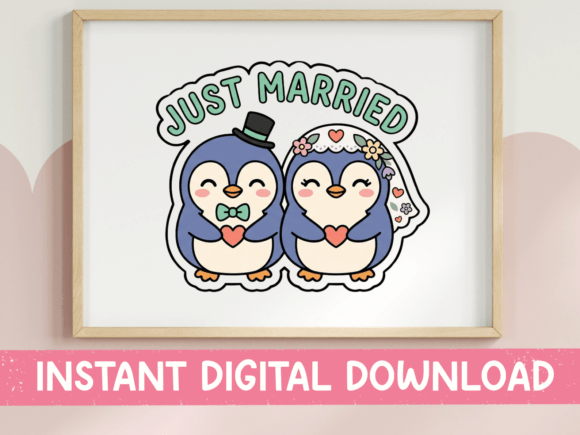
Weddings are deeply personal, and couples today are increasingly looking for unique, expressive ways to celebrate their big day. The Just Married Kawaii Penguin Wedding design offers a whimsical yet functional option for those who want to blend charm with practicality. Featuring two adorable penguins dressed in wedding attire — one in a top hat and bow tie, the other in a floral veil — this design brings a lighthearted touch to traditional wedding aesthetics. With soft navy, mint, cream, and blush tones, it’s versatile enough for cards, digital planners, scrapbooks, and more.
Why This Design Stands Out
What makes the Just Married Kawaii Penguin Wedding appealing is its balance of cuteness and usability. The kawaii (Japanese for “cute”) style resonates with a broad audience, especially those who appreciate playful illustration in design. The navy-blue penguins, mint-green lettering, and soft color palette offer a modern twist that’s both festive and elegant. Whether you're a professional wedding planner, a DIY crafter, or someone designing a personal invitation, this design adapts well across formats.
Common Mistakes When Using the Design
Despite its charm, users sometimes overlook key details when working with the Just Married Kawaii Penguin Wedding files. These missteps can affect the final outcome, especially for those unfamiliar with digital design tools. Here are some common issues and how to avoid them:
1. Assuming SVG and PNG Files Are Interchangeable
While both file types are included — SVG for scalable vector use and PNG for high-resolution raster — they serve different purposes. SVG files are ideal for cutting machines and design software where resizing without quality loss is crucial. PNG files, on the other hand, are best for print or sublimation where transparency and detail matter. Using the wrong format for your project can lead to pixelation, incorrect scaling, or compatibility issues.
Better approach: Use SVG for digital crafting, Cricut, or Silhouette projects. Stick to PNG for printed cards, digital stickers, or layered designs in Photoshop or Canva.
2. Overlooking Color Variance Across Devices
The soft mint, navy, and blush tones look lovely on screen, but they may appear slightly different when printed or viewed on another monitor. This can affect the consistency of your final product, especially if you're matching the design to physical wedding colors.
Better approach: Always check color profiles before printing. If possible, do a small print test to ensure the hues match your expectations. Calibrating your monitor or using professional-grade printers can help maintain color accuracy.
3. Skipping File Compatibility Checks
Some users download the Just Married Kawaii Penguin Wedding design without confirming whether their software supports SVG or PNG files. While most modern design tools do, older or free versions may not offer full functionality, especially with transparency or vector editing.
Better approach: Confirm that your design software (like Cricut Design Space, Adobe Illustrator, or Canva) supports the file types included. If unsure, download a free sample file from the seller before purchasing.
4. Underestimating the Need for Layer Management
Many digital designs, especially SVGs, come with multiple layers. Without proper layer management, it's easy to accidentally delete or misalign elements like the penguins, hearts, or text.
Better approach: Use layer-locking features in your software to keep important design elements intact. Group related parts together and label layers clearly for easier editing.
What to Check Before Downloading
Before purchasing or using the Just Married Kawaii Penguin Wedding design, take a few moments to verify the following details:
- License type: Make sure the file can be used for your intended purpose — personal, small business, or commercial use.
- File structure: Confirm whether the design includes multiple elements (like hearts, text, and penguins) as separate layers for customization.
- Software requirements: Ensure your design tools support SVG and PNG formats, especially if you plan to edit the files.
- Download process: Some platforms require account creation or email confirmation. Check the seller’s instructions to avoid delays.
Maximizing the Design’s Potential
The Just Married Kawaii Penguin Wedding set is more versatile than many realize. Here are a few creative ways to use it effectively:
- Custom wedding cards: Print on high-quality cardstock for a fun, memorable invitation or thank-you note.
- Planner spreads: Use the PNG file in digital planners for a cute monthly layout or event tracker.
- DIY decor: Resize the SVG for vinyl cutters to create custom signs, cupcake toppers, or table numbers.
- Sublimation gifts: Apply the design to mugs, tote bags, or coasters for a personalized wedding favor.
Choosing the Right Tools and Settings
Using the right tools can make a big difference in how well the Just Married Kawaii Penguin Wedding design performs in your project. For example, if you’re cutting with a Cricut, make sure your machine settings are adjusted for the material you’re using. If you're printing, ensure your printer is set to the highest quality setting to preserve the design’s detail and color vibrancy.
Also, remember that transparency in PNG files means you’ll need to be careful when layering over other backgrounds. Test your design on different background colors to see how it looks before finalizing your layout.
Final Thoughts
The Just Married Kawaii Penguin Wedding design is a charming, flexible choice for modern couples and creators alike. Its cute illustration style, soft color palette, and dual-format availability make it a practical asset for a variety of wedding-related projects. However, like any digital design, it requires thoughtful use to achieve the best results. By understanding file types, checking compatibility, and testing colors and layouts before final production, you can make the most of this adorable design without compromising quality or presentation.
Whether you're a professional planner or a couple creating your own invitations, taking the time to understand how the Just Married Kawaii Penguin Wedding works ensures your final product looks as sweet and polished as the design itself.