Elevate Your Brand Identity with the Color Metal Text Logo Scene Generator
Creating a strong and memorable brand presence often hinges on the visual elements that define your identity. Logos, in particular, play a pivotal role in shaping how your brand is perceived. The Color Metal Text Logo Scene Generator offers a powerful solution for designers and business owners who want to infuse their branding with a high-end, industrial aesthetic while maintaining a modern and vibrant edge. This article explores how this premium Photoshop template suite can help you achieve professional results with minimal effort, and how it can be strategically applied to meet a variety of design goals.
What Is the Color Metal Text Logo Scene Generator?
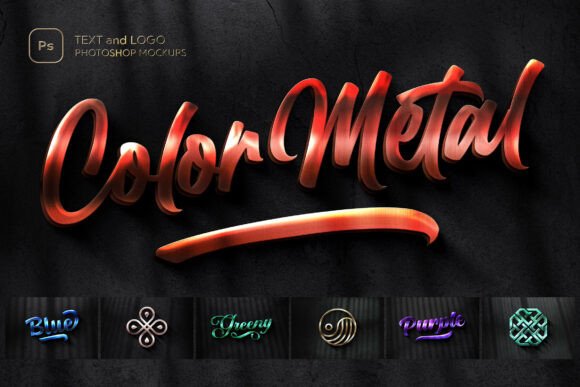
The Color Metal Text Logo Scene Generator is a curated collection of seven high-resolution Photoshop mockup templates designed to showcase text-based logos with a metallic finish. Each template is crafted to replicate the look and feel of real-world industrial materials, complete with reflective surfaces, brushed textures, and natural shadow overlays. The result is a highly realistic, visually striking presentation that brings your logo to life.
Available in a range of vibrant metallic tones—including deep anodized teals, electric magentas, and classic golds—the templates allow for seamless customization through Smart Object layers. Whether you're designing for print, digital media, or product packaging, these mockups provide a professional-grade backdrop that enhances your brand’s visual appeal.
Challenges in Logo Presentation and Branding
For many designers and small business owners, presenting a logo in a compelling and professional way can be a significant challenge. Traditional flat mockups often lack the depth and realism needed to truly showcase a logo’s potential. Additionally, creating custom metallic effects from scratch requires advanced Photoshop skills and a deep understanding of lighting, reflection, and material properties.
Businesses aiming to project a premium or industrial aesthetic may struggle to find tools that offer both flexibility and authenticity. The goal is often to create a logo that not only stands out visually but also aligns with the brand’s personality—whether that’s bold and modern, sleek and refined, or rugged and mechanical.
How the Color Metal Text Logo Scene Generator Helps
The Color Metal Text Logo Scene Generator addresses these challenges by offering a streamlined, professional-grade solution for logo presentation. Here’s how it helps:
- Instantly elevate your designs: With one-click Smart Object integration, you can insert your logo into a realistic metallic environment in seconds, eliminating the need for complex layer adjustments or material simulations.
- Enhance realism and depth: Natural shadow overlays and high-gloss finishes mimic real-world lighting conditions, giving your logo a three-dimensional, lifelike appearance.
- Customize with confidence: The templates come with clearly labeled layers and organized folders, making it easy to tweak colors, adjust textures, and fine-tune details without disrupting your workflow.
- Deliver high-quality output: At 4500 x 3000 px and 300 DPI, the templates are suitable for both print and digital use, ensuring your logo looks sharp on business cards, banners, websites, and more.
Practical Applications and Use Cases
The versatility of the Color Metal Text Logo Scene Generator makes it a valuable asset across a wide range of industries and design scenarios. Here are a few practical applications:
1. Brand Launches and Rebranding Campaigns
When introducing a new brand or refreshing an existing one, the visual presentation of your logo is critical. The metallic textures and industrial aesthetic of these mockups can help position your brand as premium, innovative, or bold—depending on your color and style choices.
2. Product Packaging and Label Design
For product-based businesses, especially in sectors like cosmetics, electronics, or luxury goods, a high-quality logo presentation can influence purchasing decisions. These mockups allow you to visualize how your logo will appear on packaging materials, giving clients or manufacturers a clear idea of the final product.
3. Digital Marketing and Social Media
In the digital space, first impressions matter. Whether you're designing a website header, a social media banner, or a promotional graphic, the Color Metal Text Logo Scene Generator helps your logo stand out with a polished, eye-catching finish.
4. Portfolio Development for Designers
Graphic designers looking to showcase their work in a professional manner can use these templates to present logo concepts with a level of realism that impresses clients and sets them apart from competitors.
Choosing the Right Metallic Finish for Your Brand
One of the standout features of the Color Metal Text Logo Scene Generator is its selection of seven distinct metallic tones. Each color conveys a different mood and message:
- Gold: Conveys luxury, sophistication, and timelessness—ideal for high-end brands or service providers.
- Blue: Offers a modern, tech-inspired vibe—perfect for startups in the digital or innovation sectors.
- Green: Evokes nature, growth, and sustainability—great for eco-friendly brands or wellness businesses.
- Purple: Suggests creativity, mystery, and royalty—suitable for artistic or premium lifestyle brands.
- Magenta: Brings energy, vibrancy, and boldness—ideal for youth-focused or fashion-forward brands.
- Teal: Combines elegance with a touch of modernity—works well for design studios or boutique brands.
- Steel Gray: Represents strength, reliability, and professionalism—often used in industrial, engineering, or corporate branding.
When selecting a color, consider your brand’s core values, target audience, and the emotions you want to evoke. You may also want to test different options to see which one resonates best with your brand identity.
Maximizing the Value of the Mockup Kit
To get the most out of the Color Metal Text Logo Scene Generator, here are a few best practices:
- Start with a clean, legible logo: Since the metallic textures add visual complexity, it’s important that your logo remains clear and readable.
- Experiment with layer effects: While the templates are designed for one-click use, don’t be afraid to dive into the layers and tweak settings like brightness, contrast, or shadow intensity for a more tailored look.
- Use in context: Consider how your logo will be used in real-world applications and choose the mockup that best matches that context—whether it’s a product label, a website header, or a printed ad.
- Pair with complementary assets: For a cohesive brand presentation, combine the mockups with other design elements like background textures, icon sets, or typography kits that align with your brand’s aesthetic.
Who Should Use the Color Metal Text Logo Scene Generator?
This mockup kit is ideal for a wide range of users, including:
- Freelance designers: Looking to present logo concepts to clients with a high level of polish and realism.
- Startup founders: Seeking to establish a strong visual identity without the need for advanced design skills.
- Marketing professionals: Needing to create consistent, high-quality branding assets across multiple platforms.
- Small business owners: Wanting to enhance their brand image with premium design elements that convey professionalism and quality.
Whether you're a seasoned designer or a beginner looking to elevate your brand, the Color Metal Text Logo Scene Generator offers a practical, time-saving solution that delivers results.
Final Thoughts
In today’s visually driven market, the way you present your brand can make all the difference. The Color Metal Text Logo Scene Generator empowers you to create high-quality, realistic logo presentations that reflect your brand’s identity and elevate your overall design game. With its combination of industrial texture, vibrant color options, and user-friendly features, it’s a versatile tool that supports both creative expression and professional execution.
By understanding your brand’s unique needs and leveraging the capabilities of this mockup kit, you can ensure your logo not only looks impressive but also communicates the right message to your audience.